


Roborock
4.63.33K Reviews
App Specs
- Version
- 4.72.02
- Updated On
- License
- Free
- Downloads
- 10,000,000+
- Developer
- Roborock
- Categories
- Lifestyle
- Platform
- Android, iOS
Screenshots
 Analysis by AppCompare
I look at the Roborock app as the control panel for a compatible robot vacuum, rather than a cleaning tool that works on its own. That distinction matters: its value depends on having a Roborock cleaner to connect, and the controls available can vary with the device. When the pairing is straightforward, though, it can turn a hands-off appliance into something I can direct around the rhythms of my home instead of simply starting and stopping it.
Who gets the most from the controls
The app makes the most sense for someone who wants to set a routine and then make occasional adjustments without being beside the vacuum. A scheduled clean can handle the regular pass, while manual controls give me a way to respond when crumbs appear in one spot or a room needs attention sooner than planned. That is more useful than a basic remote when I want the vacuum to fit into a repeatable household routine.
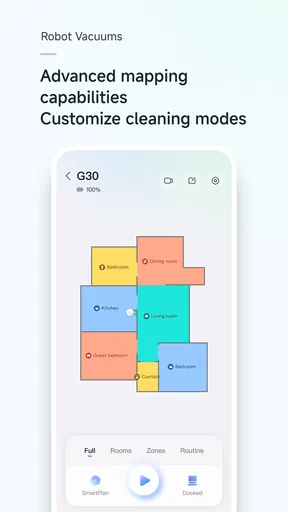
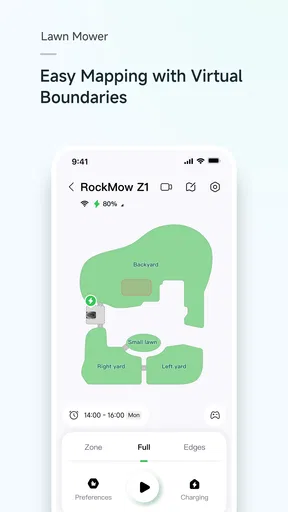
It is also a good match for people who care about where a robot goes. A map and the ability to mark no-go areas can help when a pet’s bowls, a tangle of cables, or a fragile rug make an otherwise automatic run less predictable. My practical tip is to think about those boundaries before starting a routine: a little time spent deciding what the robot should avoid can prevent repeated interruptions later.
A routine that makes the convenience tangible
Imagine leaving home for work after breakfast. You can schedule a clean for a time when the rooms are less busy, then check the report afterward to see where the vacuum travelled and how much of the mapped space it covered. If a particular corner keeps collecting crumbs, manual control can be a more focused response than running a full-home cycle. That combination—routine for ordinary upkeep, on-demand control for small messes—is where I find the app’s idea most convincing.
Reports are more useful as a way to notice patterns than as proof that every floor is spotless. If a map repeatedly shows an area being missed or a run ending early, that can prompt a check of the room layout, the robot’s route, or the cleaning setup. I would use the report to decide what to investigate, not treat a completed run as a guarantee that no follow-up is needed.
How it differs from simpler alternatives
Compared with starting a vacuum from a physical button, the app offers more context: scheduling, map-based boundaries, remote direction, and a record of a cleaning session. A simple remote may be easier when all I want is to start a run immediately, and it avoids needing to open an app. The phone-based approach earns its place when I want to control a clean from elsewhere or adjust where the robot can travel.
There is a trade-off, too. An app adds setup and a screen to manage, while a button is uncomplicated and does not depend on navigating menus. If you prefer a vacuum that needs no mapping, scheduling, or phone interaction, this will feel like unnecessary overhead. And because the app is built around Roborock cleaners, it is not a universal controller for robot vacuums from other brands.
Worth Reading Before You Choose

Baby Panda World Brings Quick Play to Modern Phones, but Its Game Library Feels Busy

ESPN’s Live Game View Makes Following Close Games Easier

QuizzLand Review: A Good Fit for Short Trivia Breaks, Not Every Player

Basketball Stars: Multiplayer Is Fast, but Can It Recover When Matches Go Wrong?

WEBTOON Turns Phone Updates Into a Better Reading Routine

Link to Windows Runs on Shared Habits, Not Social Feeds
What to consider before relying on it
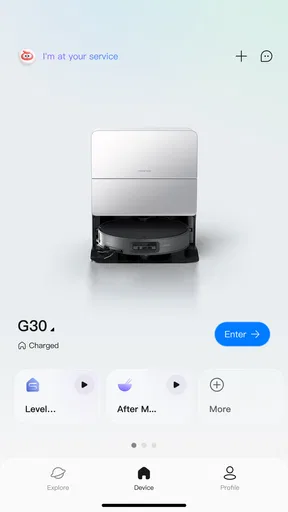
Does it work when I am away? Remote control is part of the app’s purpose, but useful control depends on having the cleaner set up and connected. I would pair it at home first, confirm that the device appears in the app, and try a basic command before depending on it to manage a clean while I am out. That small test is especially sensible if the home Wi-Fi or device connection has recently changed.
Will every control be available on every cleaner? I would not assume that. The app connects to Roborock vacuums, but a particular option may depend on the model. Before buying a robot for one feature you consider essential, check that the cleaner you are considering supports it; the app alone cannot add hardware capabilities that the vacuum does not have.
At a glance, and what the version tells me
Roborock is a free lifestyle app from Roborock, rated for Everyone. It has an average rating of 4.6 from around 354,000 ratings, with over 10 million installs. Those figures suggest that it has reached a broad audience, but I would still judge it by whether it supports the particular vacuum and routines you need, rather than treating popularity as a substitute for compatibility.
The app was released on May 23, 2019, and its current version is 4.64.06, with Android 7.0 as the minimum operating-system requirement. The version number shows that the software has continued to be revised, but it does not tell me which specific controls changed or what an update will add next. I would keep the app current for the best chance of staying aligned with the connected device, while checking the release notes when I want to understand a particular change rather than guessing from the version number.
Its 3.1 thousand reviews give another reason to look beyond the headline rating: people may be judging different Roborock models, home layouts, and expectations. I would read recent comments for clues about the exact device I own, especially if I am troubleshooting a connection or a control that behaves differently than expected. An app can be well regarded overall and still feel less smooth in a setup that does not match yours.
For anyone who already owns a compatible Roborock vacuum, I think the app is worth trying because maps, schedules, boundaries, and reports can make everyday cleaning easier to manage. For someone choosing a vacuum, I would first decide whether those phone-based controls are genuinely useful at home and then verify compatibility with the specific model. If you just want a manual start button, a simpler setup may suit you better; if you want to shape and check cleaning from your phone, this is the more capable route.
Ever wondered what it would be like to have a smart assistant that doesn’t just clean your space but does so with a touch of futuristic flair? Well, that’s where the Roborock app comes into play. I’ve had the pleasure of exploring this app, and let me tell you, it’s like having a little cleaning robot buddy right in your pocket.
Getting Started with the Roborock Experience
First things first, downloading the app is a breeze. Available on both Android and iOS, the app is easy to find and even easier to set up. Once you've got it on your phone, the app walks you through the process of connecting your Roborock device to Wi-Fi. And yes, even if tech isn’t your thing, the app’s prompts make it feel like a piece of cake.
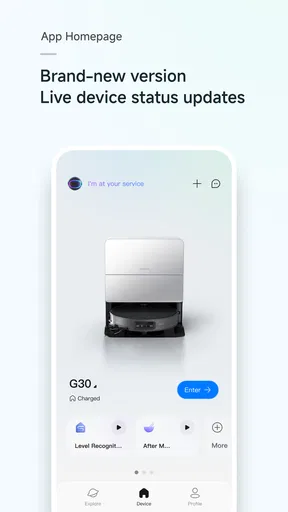
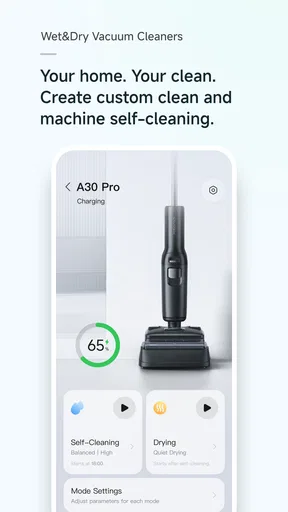
Once connected, you’ve entered a new world of smart cleaning. The app's interface is sleek and intuitive, making it simple to navigate. You’re greeted with a map of your home that the robot vacuums create autonomously. It’s like having a little floor plan of your place right on your screen!
Features That Make Life Easier
So, what can you do with the app? For starters, you can schedule cleanings, which is perfect for those hectic days when tidying up is the last thing on your mind. Just set it up, and your Roborock takes care of the rest. You can also control the vacuum manually. Feeling a bit of a control freak? Guide your Roborock using the app like it’s a fancy remote-controlled car.
One of my personal favorites is the ‘No-Go Zones’ feature. You can mark areas on the map where you’d prefer the vacuum not to venture. It’s a lifesaver if you’ve got delicate rugs or pet zones you want to keep intact.
Oh, and did I mention the cleaning reports? After each session, you get a detailed breakdown of where your robot cleaned, how long it took, and how much area it covered. It’s fascinating to see the paths it took, almost like watching a little cleaning journey unfold.
Performance and Reliability
In terms of performance, the Roborock does a stellar job. The app lets you choose different cleaning modes depending on your needs. Whether it's a light dusting or a deep carpet clean, your robot adjusts its suction power accordingly. And the best part? You can switch between modes directly from the app.
The battery life is also impressive. The app provides real-time updates on battery levels and even alerts you when it’s time for a recharge. Plus, if your Roborock is running low on juice mid-clean, it automatically returns to the dock to power up before continuing its mission. Talk about efficient!
Final Thoughts
Overall, the app truly enhances the functionality of the robot vacuum. It’s not just a tool; it’s an experience. From the user-friendly interface to the extensive features, it’s clear that Roborock has put a lot of thought into making cleaning less of a chore and more of a seamless part of modern living.
If you’re on the fence about diving into the world of smart home gadgets, this app might just tip the scales. It’s a game-changer for anyone looking to add a bit more convenience and efficiency to their daily routine. So go ahead, give it a whirl, and let technology take a load off your shoulders.
Pros
- User-friendly interface enhances navigation.
- Efficient cleaning algorithms save time.
- Customizable settings for personalized cleaning.
- Supports both Android and iOS platforms.
- Long battery life for extended cleaning sessions.
Cons
- Initial setup can be slightly complex.
- Occasional connectivity issues with app.
- Limited offline functionality without Wi-Fi.
- Some features require manual updates.
- High price point compared to competitors.
FAQs for Roborock
What platforms is the Roborock app available on?
The Roborock app is available for both Android and iOS devices. Users can download it from the Google Play Store for Android or the Apple App Store for iOS. It is compatible with a wide range of devices, ensuring you can control your Roborock vacuum from almost any smartphone or tablet.
What features does the Roborock app offer for smart cleaning?
The Roborock app provides a variety of features to enhance your cleaning experience. Users can schedule cleanings, set up virtual no-go zones, and create customized cleaning maps. The app also supports voice control through integration with smart home systems like Amazon Alexa and Google Assistant, making it highly versatile.
Is the Roborock app easy to set up and use?
Yes, the Roborock app is designed with user-friendliness in mind. The setup process is straightforward, with easy-to-follow instructions to connect your Roborock device to the app. The intuitive interface allows users to quickly access and customize cleaning settings, even if they are not tech-savvy.
Does the Roborock app require a constant internet connection?
While the Roborock app benefits from an internet connection for real-time updates and remote control features, it does not require a constant connection. The robot vacuum can perform basic cleaning tasks without internet access, but features like live mapping and remote operation will be limited.
Are there any privacy concerns with using the Roborock app?
Roborock takes user privacy seriously and has implemented measures to protect your data. The app requires minimal personal information and focuses on security to ensure your data is safe. However, as with any smart device, users should be aware of the permissions they grant and consider reviewing privacy policies regularly.


